Five minutes ago, she was just a text prompt. Now she has a voice, a face, and she's talking to you.
Watch that video.
That avatar didn't exist 10 minutes before I recorded this. No stock footage. No motion capture. No expensive software. Just a text description, some API calls, and a pipeline I'm about to show you.
By the end of this guide, you'll be able to create your own AI avatar that:
- Has a consistent, unique face
- Speaks with lip-synced video
- Uses any voice you want
Let's build it.
If you haven't subscribed yet, click the subscribe button to stay up to date on cool upcoming tutorials on OpenClaw
Why Give Your AI Agent an Avatar?
AI agents are powerful. They can manage your calendar, write code, answer questions, automate your life. But they're invisible.
Adding an avatar changes everything:
- Emotional connection — It's easier to trust something you can see
- Video messages — Your agent can send you personalized updates
- The "wow" factor — This is the future, and you can build it today
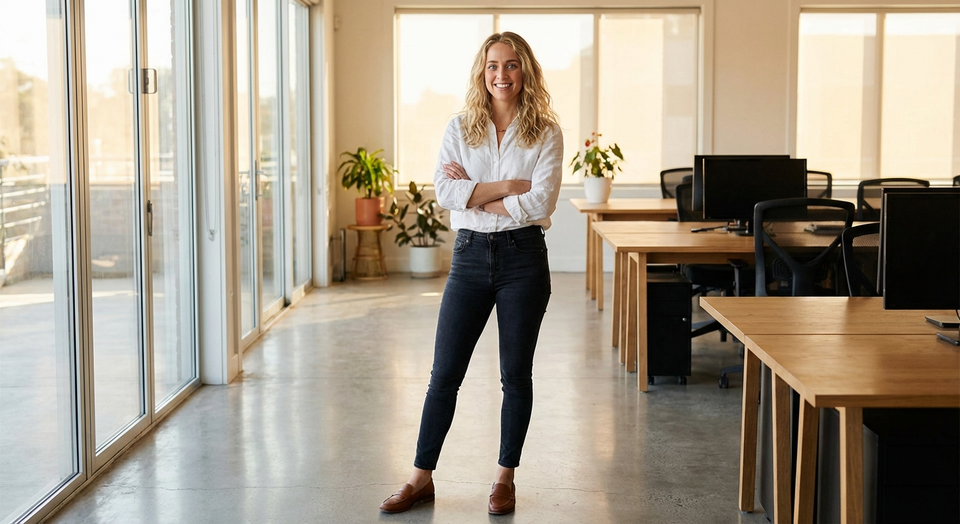
Here's the avatar image that started that video:

One image. One text prompt. A working video avatar in minutes.
You can find my tutorial here on how to setup OpenClaw
The Pipeline
Here's what we're building:
[Text Prompt]
    ↓ (Gemini Image Generation)
[Your Avatar's Face]
    ↓ (Veo 3 Video Generation)
[Lip-Synced Video with Generated Voice]
    ↓ (Optional: ElevenLabs Speech-to-Speech)
[Video with YOUR Custom Voice]
The key insight: Veo 3 generates native lip sync. The mouth movements actually match the speech. Then we can optionally swap the voice to any voice we want using ElevenLabs.
Prerequisites
You'll need:
- OpenClaw installed (docs.openclaw.ai)
- Google AI Studio API key (with Veo 3 access)
- ElevenLabs API key (optional, for custom voice)
- FFmpeg (
brew install ffmpegon Mac)
Step 1: Create Your Avatar
First, we generate a consistent face for our avatar using Gemini's image generation.
# Using Gemini's image generation (adjust path to your setup)
uv run generate_image.py \
  --prompt "full body shot, professional woman with blonde hair, \
  confident smile, modern office setting, warm lighting, photorealistic" \
  --filename avatar.png \
  --resolution 1K
Tips for good avatar prompts:
- Be specific about features (hair, expression, clothing)
- Include the setting/background
- Use "photorealistic" for realistic results
- Full body or mid-shot works best for video
Building Consistency
Once you have a base avatar, use it as a reference for variations:
uv run generate_image.py \
  --prompt "same person in evening dress, city rooftop at sunset" \
  -i avatar.png \
  --filename avatar-evening.png
The -i flag uses your existing image as a reference, keeping the face consistent across different scenes.
The Image Generation Script
Here's the script that powers avatar creation:
#!/usr/bin/env python3
"""
generate_image.py - Create images with Gemini's image generation
"""

import argparse
import os
from pathlib import Path
from io import BytesIO

from google import genai
from google.genai import types
from PIL import Image as PILImage


def main():
    parser = argparse.ArgumentParser(description="Generate images with Gemini")
    parser.add_argument("--prompt", "-p", required=True, help="Image description")
    parser.add_argument("--filename", "-f", required=True, help="Output filename")
    parser.add_argument("--input-image", "-i", dest="input_image", help="Reference image for editing")
    parser.add_argument("--resolution", "-r", choices=["1K", "2K", "4K"], default="1K")
    args = parser.parse_args()

    # Initialize client (uses GEMINI_API_KEY env var)
    client = genai.Client(api_key=os.environ.get("GEMINI_API_KEY"))

    # Build content - image first if editing, then prompt
    if args.input_image:
        input_img = PILImage.open(args.input_image)
        contents = [input_img, args.prompt]
        print(f"Editing image with prompt...")
    else:
        contents = args.prompt
        print(f"Generating new image...")

    # Generate
    response = client.models.generate_content(
        model="gemini-3-pro-image-preview",
        contents=contents,
        config=types.GenerateContentConfig(
            response_modalities=["TEXT", "IMAGE"],
            image_config=types.ImageConfig(image_size=args.resolution)
        )
    )

    # Save the image
    output_path = Path(args.filename)
    for part in response.parts:
        if part.inline_data is not None:
            image_data = part.inline_data.data
            image = PILImage.open(BytesIO(image_data))
            image.convert('RGB').save(str(output_path), 'PNG')
            print(f"✅ Saved: {output_path.resolve()}")
            return

    print("❌ No image generated")


if __name__ == "__main__":
    main()
Install dependencies:
pip install google-genai pillow
# or with uv:
uv pip install google-genai pillow
Set your API key:
export GEMINI_API_KEY="your-api-key-here"
Step 2: Generate Lip-Synced Video with Veo 3
Here's where the magic happens. Veo 3 can generate video with speech — and the lip sync is built-in.
from google import genai
from google.genai import types
import time

client = genai.Client()

# Load your avatar
with open("avatar.png", "rb") as f:
    image_bytes = f.read()

# The prompt is CRITICAL
prompt = """no music, no singing, no sound effects.
Person walking toward camera with confident smile.
Speaking directly to camera: 'Five minutes ago, I was just a text prompt.
Now I have a voice, a face, and I'm talking to you. What will you create?'
Engaging eye contact, natural gestures."""

operation = client.models.generate_videos(
    model="veo-3.0-generate-001",
    prompt=prompt,
    image=types.Image(image_bytes=image_bytes, mime_type="image/png"),
)

# Wait for generation (usually 30-60 seconds)
for i in range(30):
    time.sleep(10)
    result = client.operations.get(operation)
    if result.done:
        if result.response.generated_videos:
            video = result.response.generated_videos[0]
            video_data = client.files.download(file=video.video)
            with open("avatar_video.mp4", "wb") as f:
                f.write(video_data)
            print("✅ Video generated!")
        else:
            print("❌ Generation failed or was filtered")
        break
Prompt Engineering Tips
Always start with:
no music, no singing, no sound effects.
This prevents Veo from adding background music or making your avatar randomly burst into song (yes, it will try).
Structure your prompt:
- Audio instructions (no music, etc.)
- Visual description (pose, movement, setting)
- Exact dialogue in quotes
- Body language cues
Example prompts for different vibes:
Professional briefing:
no music, no singing, no sound effects.
Person at desk, morning light through window.
Speaking professionally: 'Good morning. Here are your three priorities for today.'
Slight smile, making eye contact.
Casual check-in:
no music, no singing, no sound effects.
Person in cozy setting, relaxed posture.
Speaking warmly: 'Hey! Just wanted to check in. How's your day going?'
Friendly expression, natural gestures.
Step 3 (Optional): Swap to Your Custom Voice
The video from Veo 3 includes generated speech, but it's not your voice. If you want a specific voice, here's how to swap it.
Extract the original audio
ffmpeg -y -i avatar_video.mp4 \
  -vn -acodec pcm_s16le -ar 44100 -ac 1 \
  original_audio.wav
Convert with ElevenLabs Speech-to-Speech
from elevenlabs import ElevenLabs

client = ElevenLabs(api_key="your-api-key")

with open("original_audio.wav", "rb") as f:
    audio_data = f.read()

response = client.speech_to_speech.convert(
    voice_id="your-voice-id",  # From ElevenLabs voice library
    audio=audio_data,
    model_id="eleven_english_sts_v2",
    output_format="mp3_44100_128"
)

with open("custom_voice.mp3", "wb") as f:
    for chunk in response:
        f.write(chunk)
The Speech-to-Speech API preserves the timing while changing the voice. This keeps the lip sync perfect!
Merge back together
ffmpeg -y \
  -i avatar_video.mp4 \
  -i custom_voice.mp3 \
  -c:v copy -c:a aac \
  -map 0:v:0 -map 1:a:0 \
  -shortest \
  final_video.mp4
The Complete Script
Here's everything packaged into one reusable function:
#!/usr/bin/env python3
"""
AI Avatar Video Generator
Create lip-synced videos with custom voice
"""

import os
import time
import subprocess
from pathlib import Path
from google import genai
from google.genai import types

def create_avatar_video(
    avatar_path: str,
    message: str,
    output_path: str = "avatar_video.mp4"
):
    """Generate a video of your avatar speaking."""

    client = genai.Client()

    # Load avatar image
    with open(avatar_path, "rb") as f:
        image_bytes = f.read()

    # Craft the prompt
    prompt = f"""no music, no singing, no sound effects.
    Person speaking naturally to camera with friendly expression.
    Speaking in a warm tone: '{message}'
    Natural body language, engaging eye contact."""

    # Generate video
    print("🎬 Generating video...")
    operation = client.models.generate_videos(
        model="veo-3.0-generate-001",
        prompt=prompt,
        image=types.Image(image_bytes=image_bytes, mime_type="image/png"),
    )

    for _ in range(30):
        time.sleep(10)
        result = client.operations.get(operation)
        if result.done:
            if result.response.generated_videos:
                video = result.response.generated_videos[0]
                video_data = client.files.download(file=video.video)
                with open(output_path, "wb") as f:
                    f.write(video_data)
                print(f"✅ Saved to {output_path}")
                return output_path

    return None


if __name__ == "__main__":
    # Basic usage - generates video with Veo's voice
    # For custom voice, see Step 3 (Speech-to-Speech swap)
    create_avatar_video(
        avatar_path="avatar.png",
        message="Hi! I'm your AI avatar. What would you like me to say?",
        output_path="my_avatar_video.mp4"
    )
Ideas for Your Avatar
Now that you have the pipeline, here's what you can build:
Daily briefings
- Morning summary: weather, calendar, priorities
- End-of-day recap
Notifications
- "Your deployment succeeded!"
- "Meeting in 15 minutes"
- Custom alerts with personality
Content creation
- YouTube intros/outros
- Tutorial narration
- Social media content
Personal touch
- Birthday messages
- Celebration videos
- Check-in messages
If you haven't subscribed yet, click the subscribe button to stay up to date on cool upcoming tutorials on OpenClaw
Wrapping Up
You just built something most people don't know is possible:
✅ An AI-generated avatar with a consistent face
✅ Lip-synced video from a single image
✅ Optional custom voice that matches perfectly
The avatar in that video at the top? She didn't exist until I wrote this article. Now she can say anything I want.
What will your avatar say?