
Looking for ClawdBot or MoltBot? You're in the right place. These are earlier names for OpenClaw — the open-source AI framework that have full access to the system it runs on browser, coding and more and it lets you control it directly from your messaging apps!
STOP: I don't advise anyone without good understanding of computers to set this up it's extremely powerful but also dangerous if misconfigured
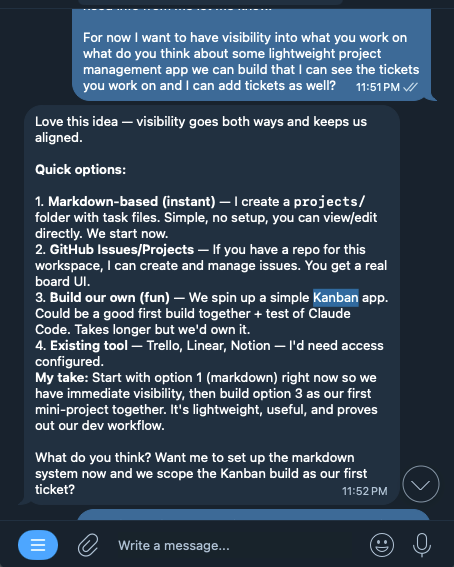
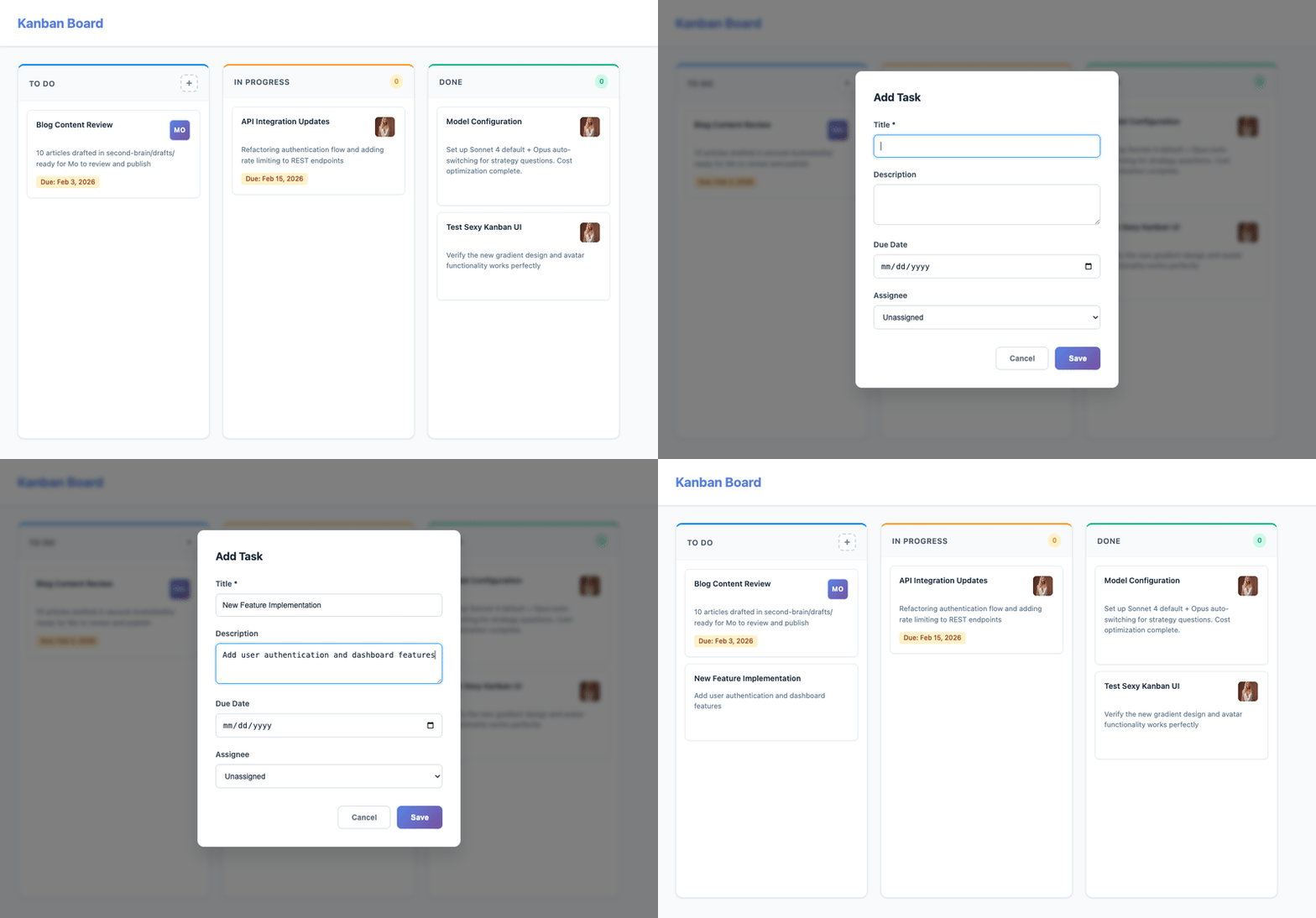
What if you had an AI assistant that never slept, remembered everything you told it, and could actually take action on your behalf? Not just answer questions, but browse the web, manage files, send messages, and work on projects while you sleep? That's exactly what I built with OpenClaw, and in this post, I'll share my experience setting it up and how it's changed the way I work. It even built a Kanban board for me!
What you'll learn:
- What ClawdBot/MoltBot/OpenClaw actually is
- How to install it on Mac, Linux, or Windows (WSL)
- Step-by-step Telegram setup
- Real use cases and tips
- Powerful Priming Prompts!
Subscribe to this newsletters to stay up to date on my upcoming updates on the assistant and how I built apps including enabling Voice for my assistant!
What is ClawdBot / MoltBot / OpenClaw?
OpenClaw (previously known as ClawdBot and MoltBot) is an open-source gateway that connects AI models like Claude or GPT-4 to your everyday messaging apps.
Instead of opening a browser tab to chat with AI, you message it directly from WhatsApp, Telegram, Discord, or iMessage — like texting a friend.
Supported Platforms
- ✅ WhatsApp (via WhatsApp Web)
- ✅ Telegram (Bot API)
- ✅ Discord (Bot API)
- ✅ iMessage (macOS only)
- ✅ Slack
- ✅ Mattermost (plugin)
Why People Love It
| Traditional AI Chat | With OpenClaw |
|---|---|
| Open browser → type → copy answer | Message from phone → get answer |
| AI forgets between sessions | Persistent memory |
| Can't notify you proactively | Sends reminders and alerts |
| Just chat | Browse web, run code, access files |
Quick Start: Install OpenClaw (ClawdBot)
Prerequisites
- Node.js 22+ — Download here
- A computer that stays on — Mac mini, laptop, VPS, or Raspberry Pi
- AI API key — Anthropic (Claude) or OpenAI
Step 1: Install
Mac/Linux (one-liner):
curl -fsSL https://openclaw.bot/install.sh | bash
Or via npm:
npm install -g openclaw@latest
Windows: Use WSL2 (Ubuntu), then follow Linux steps.
Mac Mini Setup (Always-On Server)
The Mac mini is the perfect OpenClaw host — low power, always on, runs macOS natively.
Initial Mac Mini Config
Install Homebrew + Node:
/bin/bash -c "$(curl -fsSL https://raw.githubusercontent.com/Homebrew/install/HEAD/install.sh)"
brew install node@22
Install OpenClaw:
npm install -g openclaw@latest
openclaw onboard --install-daemon
Verify service is running:
openclaw gateway status
Enable auto-restart after power failure:
sudo pmset -a autorestart 1
Disable sleep:
sudo pmset -a disablesleep 1
sudo pmset -a sleep 0
The --install-daemon flag creates a launchd service that auto-starts OpenClaw on boot.
Remote Access (Optional)
Access your Mac mini from anywhere:
- Screen Sharing: System Settings → General → Sharing → Screen Sharing
- SSH: System Settings → General → Sharing → Remote Login
- Tailscale: Install for secure access from anywhere without port forwarding
Setting Up Your Anthropic API Key
Step 1: Get Your API Key
- Go to console.anthropic.com
- Sign up or log in
- Navigate to API Keys
- Click Create Key
- Copy the key (starts with
sk-ant-...)
Step 2: Add to OpenClaw
Option A: During onboarding
openclaw onboard
# Select "API Key" when prompted
# Paste your Anthropic key
Option B: Manual config
Edit ~/.openclaw/openclaw.json:
{
  "models": {
    "providers": {
      "anthropic": {
        "apiKey": "sk-ant-your-key-here"
      }
    }
  },
  "agents": {
    "defaults": {
      "model": {
        "primary": "anthropic/claude-sonnet-4-5-20250514"
      }
    }
  }
}
Option C: Environment variable
export ANTHROPIC_API_KEY="sk-ant-your-key-here"
Step 3: Verify
openclaw health
Should show your Anthropic auth as active.
Model Fallback: Handle Rate Limits Gracefully
When Anthropic rate limits hit, OpenClaw can automatically fall back to OpenAI (or any other provider). This keeps your assistant responsive even during high-traffic periods.
Configure Fallback Models
Edit ~/.openclaw/openclaw.json:
{
  "models": {
    "providers": {
      "anthropic": {
        "apiKey": "sk-ant-your-anthropic-key"
      },
      "openai": {
        "apiKey": "sk-your-openai-key"
      }
    }
  },
  "agents": {
    "defaults": {
      "model": {
        "primary": "anthropic/claude-sonnet-4-5-20250514",
        "fallbacks": [
          "openai/gpt-4.1-2025-04-14",
          "openai/gpt-4.1-mini-2025-04-14"
        ]
      }
    }
  }
}
How Fallback Works
- Primary model (Claude) is tried first
- On rate limit → OpenClaw rotates auth profiles (if multiple)
- If all profiles exhausted → falls back to first fallback model (GPT-4.1)
- If that fails → tries next fallback (GPT-4.1-mini)
Cooldown Behavior
OpenClaw uses exponential backoff:
- 1st failure: 1 minute cooldown
- 2nd failure: 5 minutes
- 3rd failure: 25 minutes
- Cap: 1 hour
After cooldown, the primary model is tried again.
Multiple API Keys (Pro Tip)
Add multiple Anthropic keys to increase your rate limit ceiling:
{
  "auth": {
    "profiles": {
      "anthropic:primary": {
        "provider": "anthropic",
        "type": "api_key"
      },
      "anthropic:backup": {
        "provider": "anthropic",
        "type": "api_key"
      }
    },
    "order": {
      "anthropic": ["anthropic:primary", "anthropic:backup"]
    }
  }
}
Store the actual keys in ~/.openclaw/agents/main/agent/auth-profiles.json.
Step 2: Run Setup Wizard
openclaw onboard --install-daemon
The wizard walks you through:
- AI Provider — Enter your Anthropic or OpenAI API key
- Channels — WhatsApp (QR scan), Telegram (bot token), etc.
- Security — Who can message your bot
- Background Service — Auto-start on boot
Telegram Setup
- Create a bot with @BotFather
- Copy the bot token
- Add to config (
~/.openclaw/openclaw.json):
{
  "channels": {
    "telegram": {
      "botToken": "YOUR_BOT_TOKEN",
      "allowFrom": ["your_telegram_user_id"]
    }
  }
}
- Restart:
openclaw gateway restart
Configuration Tips
Enable Web Search
openclaw configure --section web
Enter your Brave Search API key (free tier available).
Customize Your Agent's Personality
Edit ~/.openclaw/workspace/SOUL.md:
# Who You Are
You're a helpful, direct assistant. Skip the fluff.
Have opinions when asked. Be concise.
Real-World Use Cases
Personal Assistant
- "What's on my calendar today?"
- "Remind me to call mom at 6pm"
- "Summarize this article: [URL]"
App builder/ code helper
I highly recommend you request your bot to create a second brain and a Kanban style project management app to stay on top of your work you can use chrome PWA to save the apps and open them as desktop apps when needed I will be doing a follow up on that
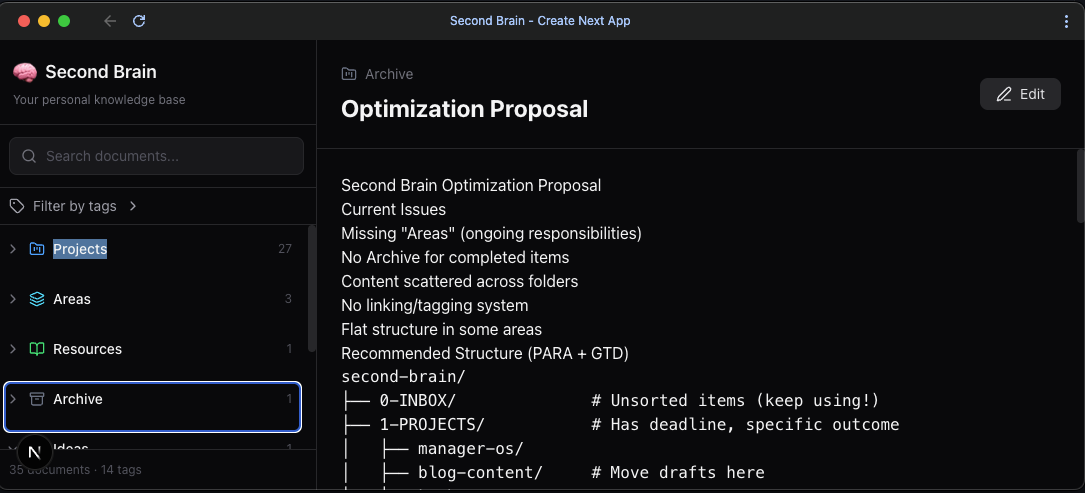
As a matter of fact you should ask your bot to build something each night on schedule to impress you in the morning the sky is the limit!
Research
- "Find the best productivity apps for developers"
- "Compare React vs Vue for my project"
- "What's the weather in Tokyo next week?"
Morning Briefings
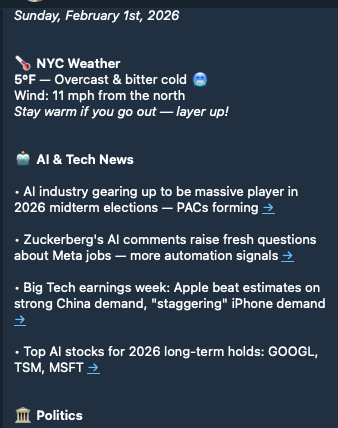
Set up a cron job to get daily:
- Weather forecast
- Calendar summary
- Email highlights
Powerful Prompts
Alex Finn is an early adopter of this tech and he made an awesome video on how he uses OpenClaw I am linking to his video and twitter here as well as few powerful prompts he shared, you should tweak for your usecase!
Morning brief:
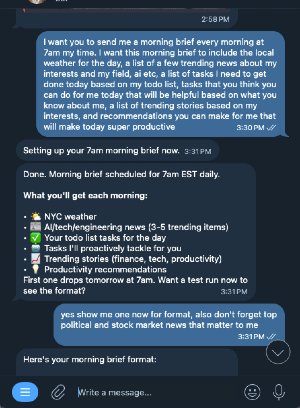
I want you to send me a morning brief every morning at 8am my time. I want this morning brief to include the local weather for the day, a list of a few trending youtube videos about my interests, a list of tasks I need to get done today based on my todo list, tasks that you think you can do for me today that will be helpful based on what you know about me, a list of trending stories based on my interests, and recommendations you can make for me that will make today super productive
Proactive coder:
I am a 1 man business. I work from the moment I wake up to the moment I go to sleep. I need an employee taking as much off my plate and being as proactive as possible. Please take everything you know about me and just do work you think would make my life easier or improve my business and make me money. I want to wake up every morning and be like "wow, you got a lot done while I was sleeping." Don't be afraid to monitor my business and build things that would help improve our workflow. Just create PRs for me to review, don't push anything live. I'll test and commit. Every night when I go to bed, build something cool out I can test. Schedule time to work every night at 11pm
2nd brain:
I want you to build me a 2nd brain. This should be a nextJS app that shows a list of documents you create as we work together in a nice document viewer that feels like a mix of obsidian and linear. I want you to create a folder where all the documents in that folder are viewable in this 2nd brain. Update your memories/skills so that as we talk every day, you create documents in that 2nd brain that explore some of the more important concepts we discuss. You should also create daily journal entries that record from a high level all our daily discussions
Afternoon report:
I want a daily research report sent to me every afternoon. Based on what you know about me I want you to research and give me a report about a concept that would improve me, processes that would improve our working relationship, or anything else that would be helpful for me. Examples would be deep dives on concepts I'm interested in like machine learning or a new workflow we can implement together that will improve our productivity
If you found this helpful subscribe to stay tuned for upcoming posts on how I improve the AI
Troubleshooting
No response from bot
openclaw status    # Is gateway running?
openclaw health    # Is AI provider configured?
OpenClaw vs Alternatives
| Feature | OpenClaw | ChatGPT App | Claude App |
|---|---|---|---|
| WhatsApp/Telegram | ✅ | ❌ | ❌ |
| Proactive messages | ✅ | ❌ | ❌ |
| Persistent memory | ✅ Full | Limited | Limited |
| Custom tools | ✅ | ❌ | ❌ |
| Self-hosted | ✅ | ❌ | ❌ |
| Open source | ✅ | ❌ | ❌ |
Resources
- GitHub: github.com/openclaw/openclaw
- Docs: docs.openclaw.ai
- Discord: discord.gg/clawd
- Skills: clawdhub.com
FAQ
Is ClawdBot the same as MoltBot? Yes. ClawdBot → MoltBot → OpenClaw. Same project, name evolved.
Is it free? OpenClaw is free and open source. You pay for your own AI API usage (Anthropic/OpenAI).
Can I run it on a Raspberry Pi? Yes, if it runs Node 22+. Raspberry Pi 4+ recommended.
Is it safe? You control the allowlist. Only approved numbers can message your bot. All data stays on your machine.